
So you just took over ADFS support. Maybe it was a new role, maybe someone left and you inherited the infrastructure equivalent of a mystery box. Either way, your day-to-day is pretty chill, check the server health, make sure the Relying Party Trusts are happy, grab your coffee. Life is good.
Until it isn’t.
One day, out of nowhere, remote users start screaming that they can’t log in. VPN is down. External access is broken. The MFA prompt isn’t even showing up, users are just getting a cold, heartless 401 Unauthorized before they even get a chance to prove who they are. The NOC is blowing up. Managers are asking questions. You’re staring at ADFS event logs at 6am wondering what you did to deserve this.
Welcome to the Azure MFA Certificate expiration club. Population: you, and everyone else who didn’t know this cert existed.
So What Happened?
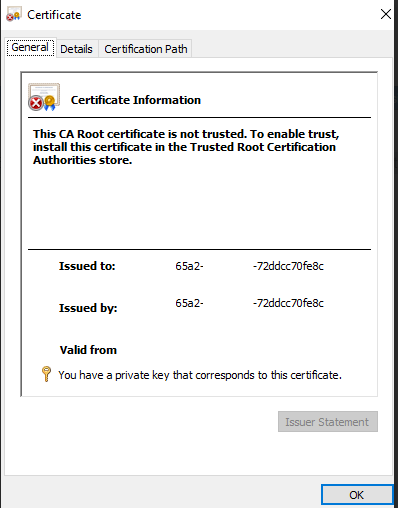
Here’s the thing nobody told you, when ADFS is integrated with Azure MFA, there is a self-signed certificate sitting quietly in the Personal certificate store of your ADFS servers. This cert is how ADFS authenticates to Microsoft’s Azure MFA service behind the scenes.
It is not in your internal PKI. It is not an external cert from DigiCert or whoever you use. It does not show up in your normal certificate monitoring. It just sits there. Waiting. Aging gracefully. Until it doesn’t.
When it expires, ADFS tries to call Azure MFA, gets rejected, and your users get a 401 before MFA even has a chance to load. The worst part? The error isn’t exactly obvious. You’ll be digging through event logs, questioning your life choices, and probably opening a Microsoft support case before anyone points at that quiet little cert in the corner. 🙃
The Fix
Good news, the fix is actually straightforward once you know what you’re dealing with.
Step 1 — Regenerate the Azure MFA certificate on your ADFS servers:
powershell
# Run on ALL ADFS servers$newcert = New-AdfsAzureMfaTenantCertificate -TenantId xxxxx-65a2-xxxx-xxxx-72ddcc70fe8c (Replace this with the IDs from the expired certificate)
Step 2 — Bind the new certificate:
powershell
# Run on ALL ADFS serversConnect-MgGraph -Scopes 'Application.ReadWrite.All'$servicePrincipalId = (Get-MgServicePrincipal -Filter "appid eq '981f26a1-7f43-403b-a875-f8b09b8cd720'").Id$keyCredentials = (Get-MgServicePrincipal -Filter "appid eq '981f26a1-7f43-403b-a875-f8b09b8cd720'").KeyCredentials$certX509 = [System.Security.Cryptography.X509Certificates.X509Certificate2]([System.Convert]::FromBase64String($newcert))$newKey = @(@{ CustomKeyIdentifier = $null DisplayName = $certX509.Subject EndDateTime = $null Key = $certX509.GetRawCertData() KeyId = [guid]::NewGuid() StartDateTime = $null Type = "AsymmetricX509Cert" Usage = "Verify" AdditionalProperties = $null})$keyCredentials += $newKeyUpdate-MgServicePrincipal -ServicePrincipalId $servicePrincipalId -KeyCredentials $keyCredentialsConnect-MgGraph -Scopes 'Application.ReadWrite.All'$servicePrincipalId = (Get-MgServicePrincipal -Filter "appid eq '981f26a1-7f43-403b-a875-f8b09b8cd720'").Id$keyCredentials = (Get-MgServicePrincipal -Filter "appid eq '981f26a1-7f43-403b-a875-f8b09b8cd720'").KeyCredentials$certX509 = [System.Security.Cryptography.X509Certificates.X509Certificate2]([System.Convert]::FromBase64String($newcert))$newKey = @(@{ CustomKeyIdentifier = $null DisplayName = $certX509.Subject EndDateTime = $null Key = $certX509.GetRawCertData() KeyId = [guid]::NewGuid() StartDateTime = $null Type = "AsymmetricX509Cert" Usage = "Verify" AdditionalProperties = $null})$keyCredentials += $newKeyUpdate-MgServicePrincipal -ServicePrincipalId $servicePrincipalId -KeyCredentials $keyCredentials
Step 3 — Restart the ADFS service:
powershell
Restart-Service adfssrv
That’s it. MFA comes back, users stop yelling, you can finish your coffee. ☕
How To Make Sure This Never Happens Again
- Set a calendar reminder for yourself to renew this cert before it expires. Microsoft will not remind you. ADFS will not remind you. The cert will simply expire and take your MFA with it.
- Configure SolarWinds (or whatever monitoring tool you use) to watch ALL certificates in the Personal store on your ADFS servers — not just the ones from your PKI. This cert lives there and it needs to be watched.
- Bonus points — if your org is planning to migrate Relying Party Trusts to Entra ID, get that on the roadmap. The less you rely on ADFS, the fewer mystery certs you have to babysit.
TL;DR
There’s a self-signed Azure cert in your ADFS servers that nobody told you about. It expires. When it does, Azure MFA breaks and your users can’t authenticate remotely. Regenerate it, restart ADFS, add it to your monitoring, and put a calendar reminder so future-you isn’t debugging this at 9am on a Monday.
You’re welcome. 😄
Bonus Since you are at the end of the post
PowerShell Script to monitor 🙂
# Azure MFA Certificate Weekly Monitor# Scans Personal cert store on ADFS servers and emails a report$ADFSServers = @("ADFSSERVER01", "ADFSSERVER02") # Add your ADFS servers here$SMTPServer = "your-smtp-server"$EmailFrom = "adfs-monitor@yourdomain.com"$EmailTo = "your-team@yourdomain.com"$WarningDays = 90 # Alert if cert expires within 90 days$report = @()foreach ($server in $ADFSServers) { $certs = Invoke-Command -ComputerName $server -ScriptBlock { Get-ChildItem -Path Cert:\LocalMachine\My | Select-Object Subject, Thumbprint, NotAfter, Issuer } foreach ($cert in $certs) { $daysRemaining = ($cert.NotAfter - (Get-Date)).Days $status = if ($daysRemaining -lt 0) { "⛔ EXPIRED" } elseif ($daysRemaining -le $WarningDays) { "⚠️ EXPIRING SOON" } else { "✅ OK" } $report += [PSCustomObject]@{ Server = $server Subject = $cert.Subject Thumbprint = $cert.Thumbprint Issuer = $cert.Issuer ExpiryDate = $cert.NotAfter.ToString("yyyy-MM-dd") DaysRemaining = $daysRemaining Status = $status } }}# Build HTML report$html = @"<html><head><style> body { font-family: Arial, sans-serif; } table { border-collapse: collapse; width: 100%; } th { background-color: #003366; color: white; padding: 8px; text-align: left; } td { padding: 8px; border: 1px solid #ddd; } tr:nth-child(even) { background-color: #f2f2f2; }</style></head><body><h2>ADFS Certificate Store - Weekly Report</h2><p>Generated: $(Get-Date -Format "yyyy-MM-dd HH:mm")</p><table><tr> <th>Server</th> <th>Subject</th> <th>Issuer</th> <th>Expiry Date</th> <th>Days Remaining</th> <th>Status</th></tr>$(foreach ($row in $report) { $color = if ($row.Status -like "*EXPIRED*") { "#ffcccc" } elseif ($row.Status -like "*EXPIRING*") { "#fff3cc" } else { "white" } "<tr style='background-color:$color'> <td>$($row.Server)</td> <td>$($row.Subject)</td> <td>$($row.Issuer)</td> <td>$($row.ExpiryDate)</td> <td>$($row.DaysRemaining)</td> <td>$($row.Status)</td> </tr>"})</table></body></html>"@# Send email$mailParams = @{ From = $EmailFrom To = $EmailTo Subject = "📋 Weekly ADFS Certificate Report - $(Get-Date -Format 'yyyy-MM-dd')" Body = $html BodyAsHtml = $true SmtpServer = $SMTPServer}Send-MailMessage @mailParamsWrite-Host "Report sent successfully."
To schedule it weekly via Task Scheduler:
powershell
$action = New-ScheduledTaskAction -Execute "PowerShell.exe" -Argument "-File C:\Scripts\ADFS-CertMonitor.ps1"$trigger = New-ScheduledTaskTrigger -Weekly -DaysOfWeek Monday -At 8amRegister-ScheduledTask -TaskName "ADFS Cert Weekly Report" -Action $action -Trigger $trigger -RunLevel Highest
What the report gives you:
- ✅ Green — cert is healthy
- ⚠️ Yellow — expiring within 90 days, time to act
- ⛔ Red — already expired, why are you reading the email, go fix it
Save the script to C:\Scripts\ADFS-CertMonitor.ps1, plug in your ADFS server names and SMTP details, schedule it, and you’ll never be blindsided by a cert again. Future you will be grateful.










 Tech Dad